Monitor & manage your hardware from anywhere.TM
xPUman connects your LiquaCool cooling hardware to the cloud. A desktop agent reads live sensor data and relays it securely - your phone picks it up in real time.
Simple, transparent pricing.
Start free. Scale for a dollar per node.
Up to 3 nodes - full features, no credit card required.
- Desktop agent (Windows & Linux)
- Mobile app (iOS & Android)
- Real-time cloud relay
- Fan & pump control
- Virtual demo mode
4+ nodes - everything in Free, unlimited scale.
- Everything in Free
- Unlimited nodes
- Extended data retention
- Email & push alerts
- Priority support
Enterprise needs, volume deployments, or special requirements.
- Everything in Standard
- Volume discounts
- SLA & dedicated support
- On-premises data option
- Custom integrations
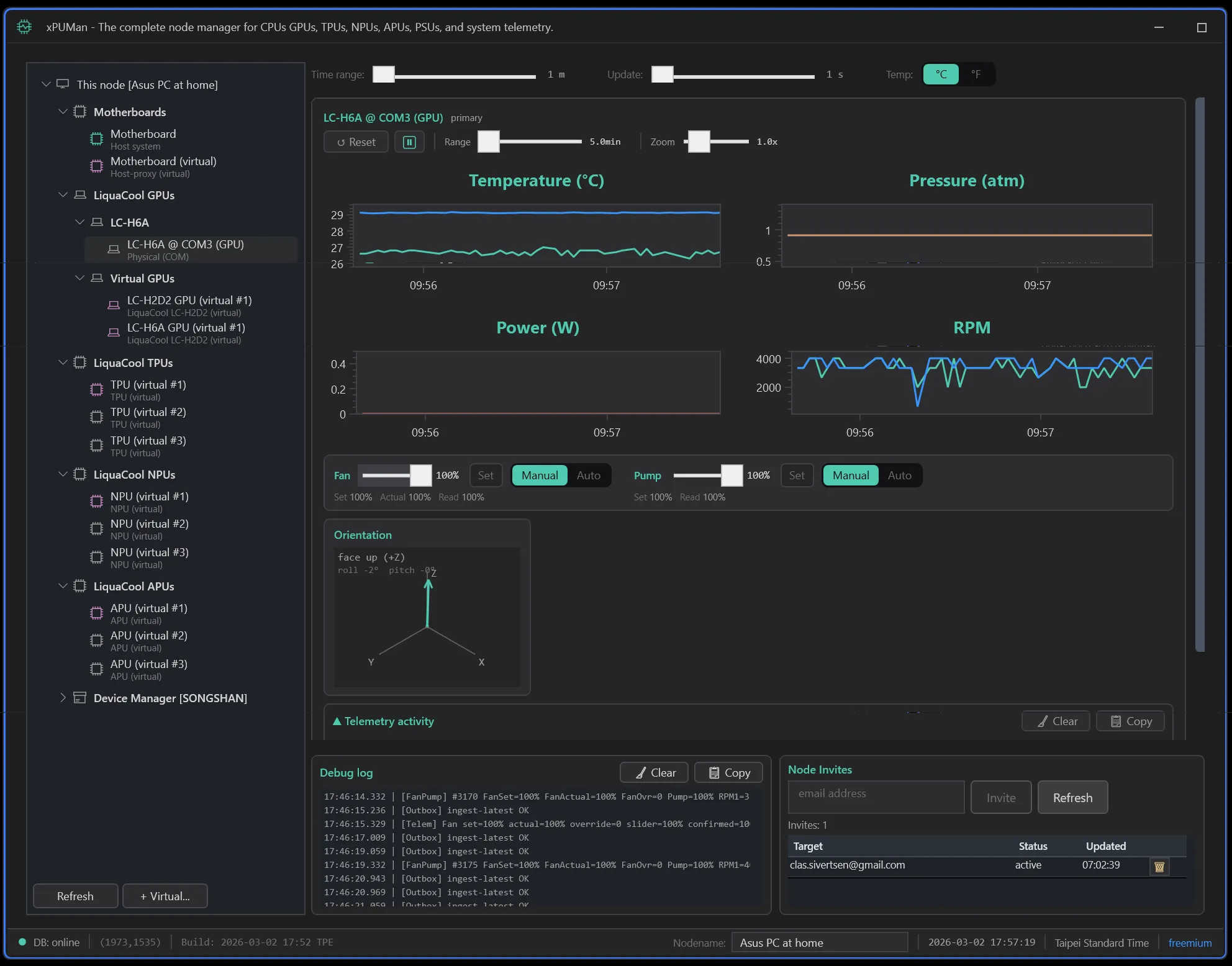
xPUman Desktop Agent
The local Windows agent that reads LiquaCool hardware sensors, displays live telemetry, controls fan and pump duty, and relays data to the cloud for remote monitoring.
| Specification | Details |
|---|---|
| Platforms | Windows 10/11 (x64), Ubuntu 24.04 LTS (x64) |
| Version | v1.0.0 |
| Tech Stack | C# .NET 8, WPF, OxyPlot |
| System Requirements | Windows 10 or later, .NET 8 runtime, USB port for LiquaCool hardware (or run in virtual/demo mode) |
| Connectivity | Internet connection for cloud relay to Supabase; LiquaCool hardware via internal USB (virtual COM port, 230400 baud) |
| License | Free up to 3 nodes, $1/node/month beyond |
Key Features
Multi-Device Tree
Ctrl/Shift multi-select across GPUs, CPUs, and PSUs. View multiple resources simultaneously with independent telemetry panels.
Interactive Charts
Four OxyPlot charts per resource: temperature, pressure, power, RPM. Time-range slider from 30 seconds to 2 hours, vertical zoom, and pop-out detail windows.
Fan & Pump Control
Set fan and pump duty with real-time firmware readback confirmation. Auto mode uses a firmware-driven thermal curve with 1°C hysteresis.
Zero-Drop Cloud Relay
Local outbox queue with retry and backoff ensures no telemetry is lost, even over flaky connections. Fast-flush on shutdown captures every last sample.
Host Machine Metrics
CPU utilization, RAM usage, disk, GPU utilization, and network stats from the host PC, displayed alongside LiquaCool hardware telemetry.
Virtual Demo Mode
Run the entire platform with simulated hardware (XPU_SIM_ONLY=1). Demo to customers, test integrations, and develop without plugging in a single cable.
Download
xPUman Mobile App
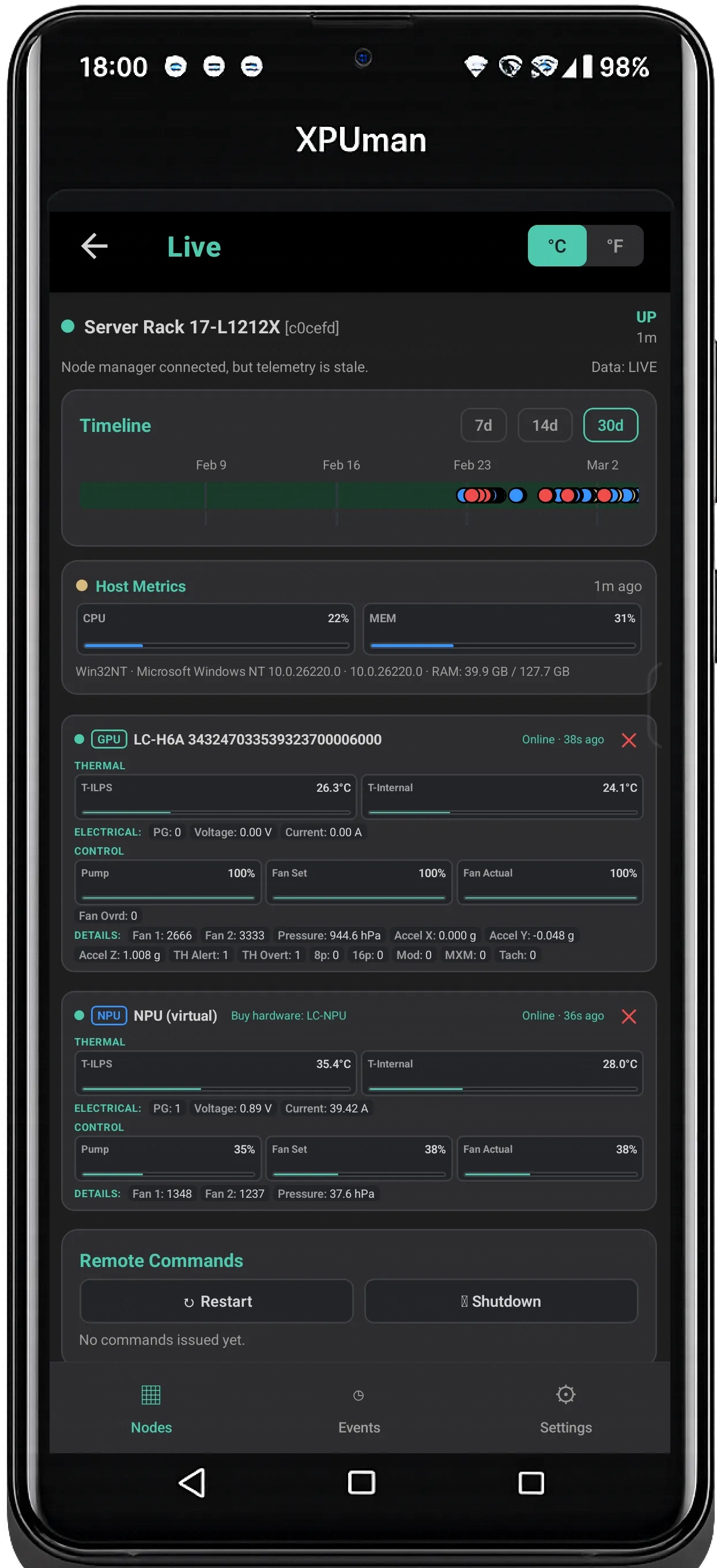
Monitor your LiquaCool liquid-cooling hardware from anywhere. Live GPU temps, fan status, pressure, and host metrics on your phone via real-time WebSocket.
| Specification | Details |
|---|---|
| Platforms | iOS 15+, Android 10+, Web (fallback) |
| Version | v0.1.0 |
| Tech Stack | React Native 0.81.5, Expo 54, TypeScript, Supabase |
| System Requirements | iPhone or Android phone with internet connection; xPUman Desktop Agent running on a PC with LiquaCool hardware (or use virtual nodes for demo) |
| Connectivity | Supabase Realtime (WebSocket) for instant updates; 60-second fallback HTTP polling; WebRTC signaling for future direct transport |
| License | Included with xPUman subscription |
Key Features
Real-Time Dashboard
All your LiquaCool nodes in one scrollable list. Each card shows online/offline status, gauge bars for CPU, RAM, GPU temp, and coolant pressure, updating live via WebSocket.
Deep Telemetry Detail
Tap any node for full per-resource telemetry. Gauge bars for temperatures and percentages, compact cells for RPM, voltage, current, power, and pressure. Dynamically rendered from hardware data.
Passwordless Auth
Email OTP sign-in powered by Supabase Auth. No passwords to remember or leak. Enter your email, get a code, done.
Node Sharing & Invites
Share hardware visibility with teammates or clients using invite codes. Role-based access keeps control where it belongs. Real-time invite notifications.
Event Feed & Alerts
Per-device and cross-device event timelines with severity filtering. Color-coded critical, warning, and info events with timestamps and recommended actions.
Virtual Nodes
Create simulated nodes that generate realistic telemetry drift. Demo the app to customers, test integrations, or explore the platform without any hardware.
Get the App
Mobile App